
Answer guests quickly and win more bookings.
Reply in 3 simple steps · Fast answers get more bookings
Find it any time in Dashboard → Messages
- 1
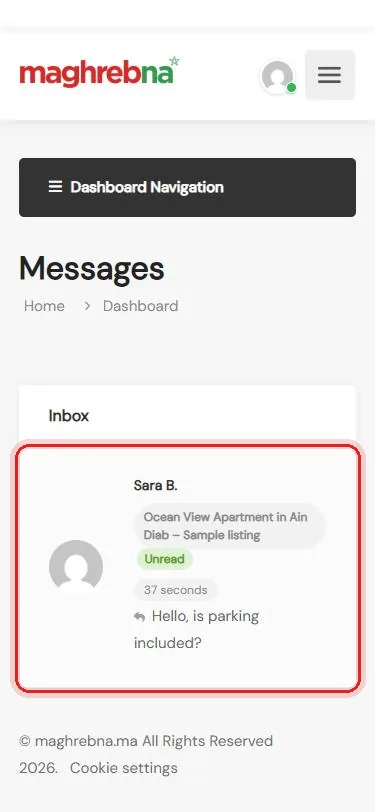
Open the message
Dashboard → Messages → tap the conversation
- 2
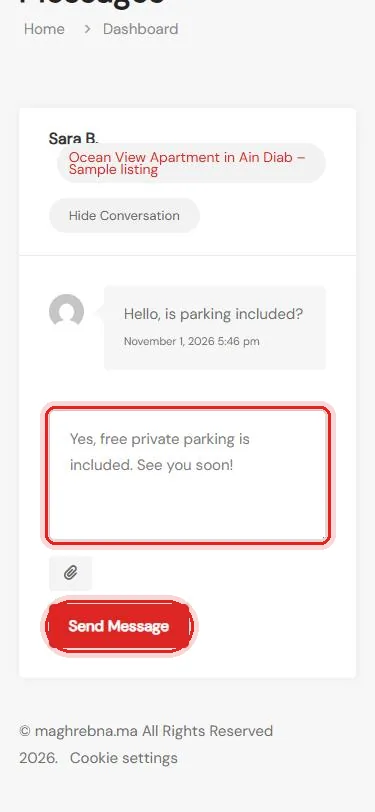
Write your reply
Type your answer, then Send Message
- 3
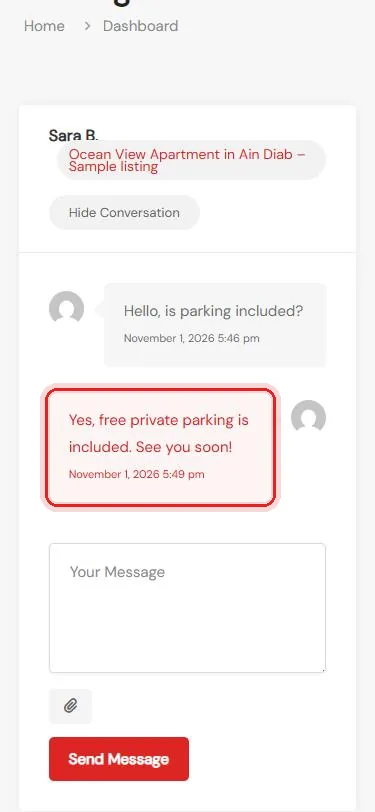
Done
The guest sees your reply in their Messages
Questions about messages? We’re happy to help.
Questions
How do I know I have a new message?
It shows as Unread in Dashboard → Messages, and you also get an email if you haven’t read it after about 15 minutes.
A guest wrote to me by email. Is that normal?
Yes. The “Message Vendor” form on your listing sends you an email called “Booking Inquiry for: …”. Just press Reply in your email.
Why are phone numbers hidden in messages?
To keep everyone safe, phone numbers, emails and links are hidden in chat messages.
Can I send a photo or a file?
Yes. Tap the paperclip under the message box to attach a file.