
A complete profile wins guests’ trust. Set it up in 3 steps.
Add a photo, a few words about you and your WhatsApp
Find it any time in Dashboard → My Profile
- 1
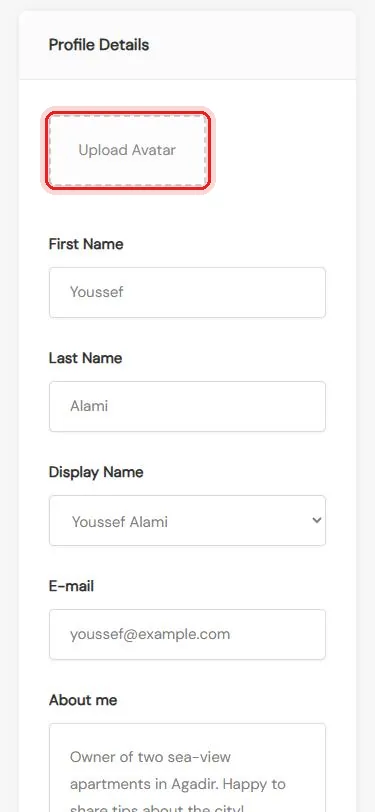
Add a photo
Tap Upload Avatar and check your name
- 2
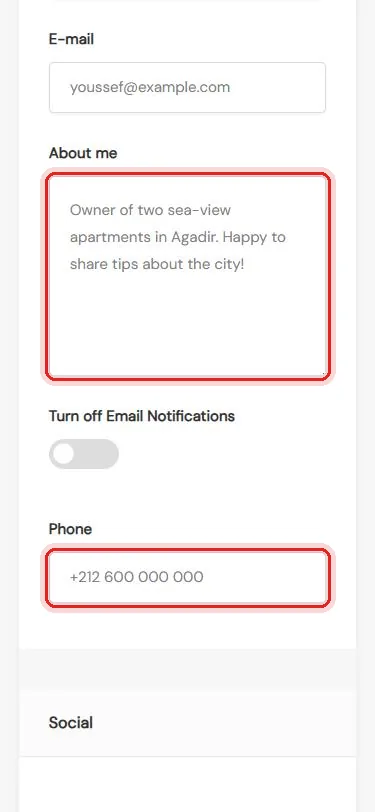
Say hello
A few words in About me, and your phone
- 3
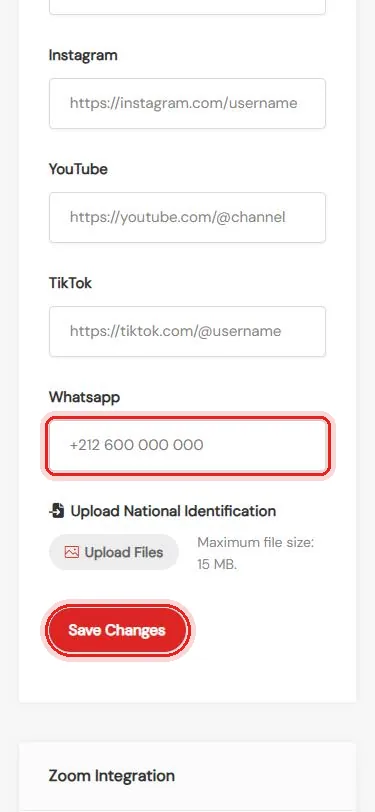
Add WhatsApp and save
Your WhatsApp number, then Save Changes
Need help with your profile? We’re happy to help.
Questions
What photo should I use?
A clear, friendly photo of your face, or your logo if you are a company.
Who can see my contact details?
Your profile page is public, so guests can see the contact details you add. Use the email and number you want guests to use.
How should I write my phone number?
With the country code, for example +212 6XX XX XX XX.
What should I write in About me?
Two or three friendly lines: who you are, your properties, and how you like to welcome guests.