
Plans changed? Cancel your booking in 3 simple steps.
Nothing is paid online · Takes less than a minute
Find it any time in My Account → My Bookings
- 1
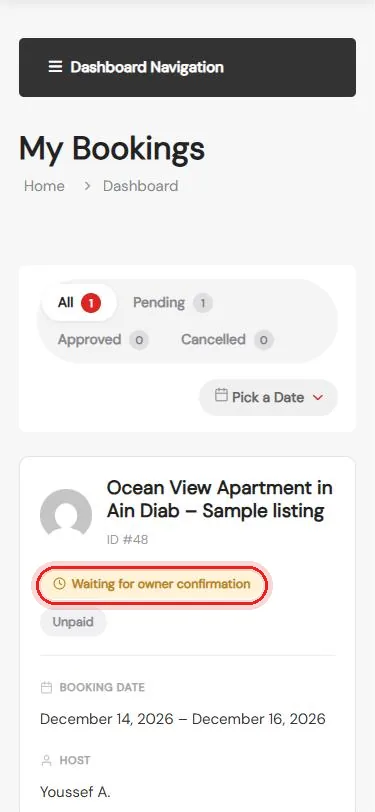
Open My Bookings
My Account → My Bookings
- 2
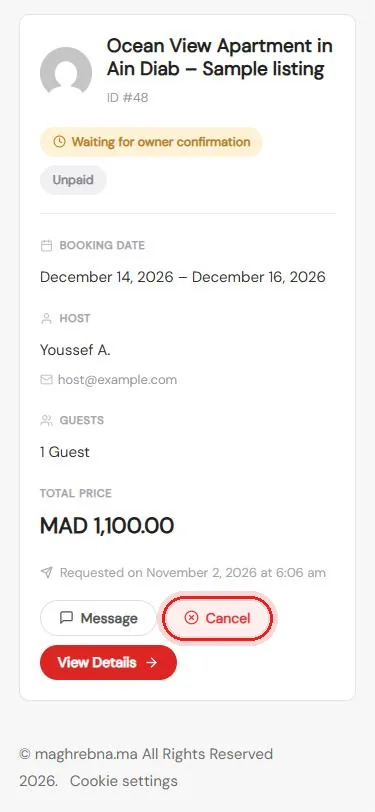
Tap Cancel
On the booking, then confirm
- 3
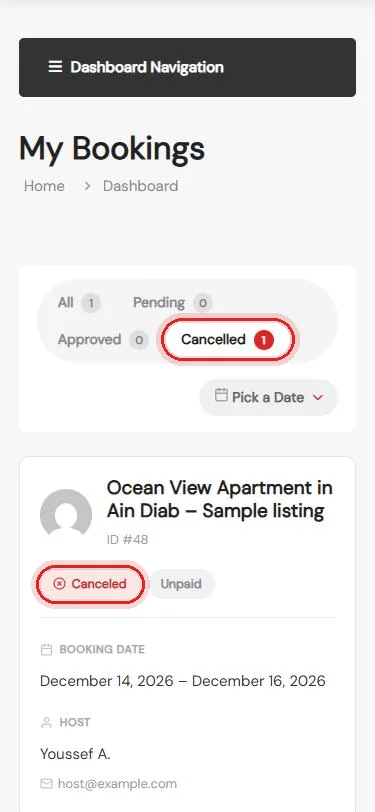
Done
The booking now shows as Canceled
Questions about your booking? We’re happy to help.
Questions
Do I pay anything to cancel?
Nothing is paid online on Maghrebna. If you already paid the owner directly, ask them about a refund.
Can I change my dates instead?
Message the owner first, or cancel and send a new request with the new dates.
Can I tell the owner why I cancelled?
Yes. Tap Message on the booking to send a short note.